Automation Flow
Operator Model
Use this page for the build order before you drop into playbooks and roles.
If you are starting from zero, read PREREQUISITES first.
The lab moves through three execution contexts:
- AWS tenant and host provisioning for
virt-01 - operator workstation/bootstrap to
virt-01 - bastion-native execution from
bastion-01
The host CPU-management design used by the bootstrap and guest-build phases is documented separately in:
The two primary operator entrypoints are:
./scripts/run_local_playbook.shplaybooks/site-bootstrap.yml./scripts/run_remote_bastion_playbook.shplaybooks/site-lab.yml
If you need the internal execution model behind that split, including workstation validation, bastion staging, runner-state files, and dashboard handoff behavior, read:
If you need the formal current-state auth and authorization model, read:
If you need the planned future auth-policy model where AD becomes the user and group source of truth while IdM local groups remain the authorization boundary, read:
Flow Diagram
The SVG below is the easiest way to understand the happy path at a glance. It groups the work into the same execution phases the operator experiences in practice.
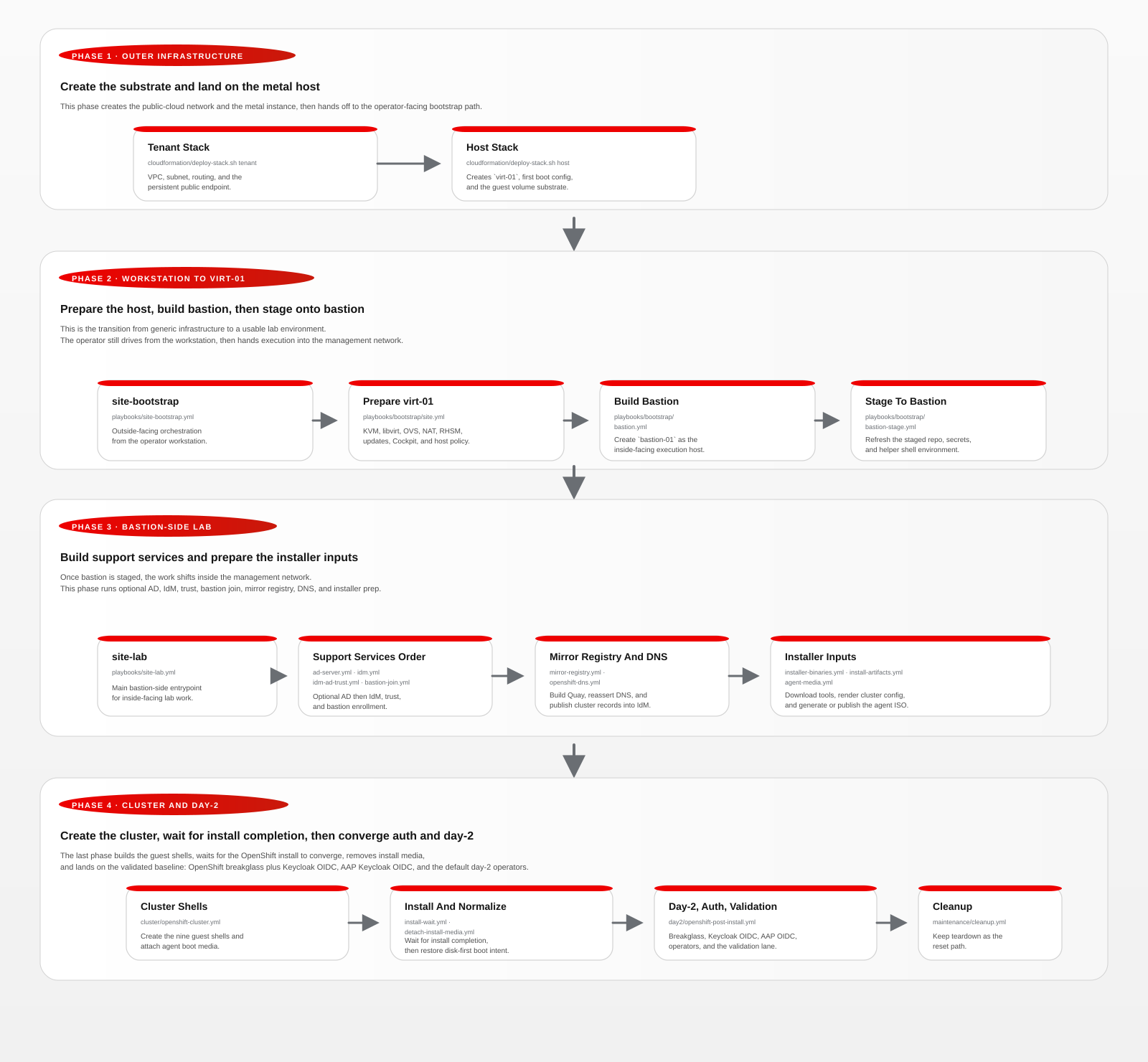
Phase Summary
- Phase 1, outer infrastructure:
- create the tenant and host stacks so
virt-01exists with the expected network and guest-volume substrate
- create the tenant and host stacks so
- Phase 2, workstation to
virt-01:- bootstrap the hypervisor
- build
bastion-01 - stage the project onto bastion
- Phase 3, bastion-side support services:
- optionally build
ad-01with AD DS and AD CS - build
idm-01 - join
bastion-01to IdM after identity services are ready - reassert and validate authoritative A/PTR records for static-IP support guests instead of relying on client-side dynamic DNS updates
- build mirror-registry
- publish OpenShift DNS
- prepare installer binaries, artifacts, and agent media
- optionally build
- Phase 4, cluster and day-2:
- create the nine nested OpenShift guests
- wait for install completion
- normalize the domain boot state and apply the baseline day-2 config
- converge on:
HTPasswdbreakglass plus Keycloak OIDC for OpenShift- Keycloak OIDC for AAP
- AD-backed user login through the IdM/Keycloak path when trust is enabled
Recommended Run Order
Where each step runs
| Steps | Where | What happens |
|---|---|---|
| 1-6 | Operator workstation | AWS stacks, hypervisor bootstrap, bastion build, bastion staging |
| 7-20 | bastion-01 |
optional AD, IdM, bastion join, mirror registry, DNS, cluster build, day-2 configuration |
Important
Pick a side and stay on it. Steps 1-6 run from the operator workstation. Steps 7-20 run from the bastion. The project does not account for switching execution context mid-stream. If you start a bastion-side step from the workstation and then run the next step directly on bastion (or vice versa), generated state will diverge and later steps will fail in ways that are hard to diagnose.
Command shorthand
- RUN LOCALLY — from the operator workstation at the project root
- RUN ON BASTION — from
bastion-01at/opt/openshift/aws-metal-openshift-demo ./scripts/run_local_playbook.sh— runs a workstation-side play with tracked PID/log/RC state under~/.local/state/calabi-playbooks/./scripts/run_remote_bastion_playbook.sh— runs a bastion play from the workstation (restages first)./scripts/lab-dashboard.sh— can now run from the workstation before the bastion handoff, then switch to bastion-native runner state after handoff
Note
site-lab.yml does not start directly on bastion. It first runs local
validation and bastion-stage.yml, then SSH-handoffs into the bastion-side
tracked runner. That execution plumbing is documented separately in
ORCHESTRATION PLUMBING.
cloudformation/deploy-stack.sh tenant- Renders and deploys the AWS tenant stack for the VPC, subnet, route table, and persistent Elastic IP reserved for
virt-01. - RUN LOCALLY
./cloudformation/deploy-stack.sh tenant
- Renders and deploys the AWS tenant stack for the VPC, subnet, route table, and persistent Elastic IP reserved for
cloudformation/deploy-stack.sh host- Renders and deploys the host-only CloudFormation stack for
virt-01, its first-boot cloud-init configuration, security group, imported key pair, and the attached guest EBS volume set. - This remains the rebuild entrypoint when the AWS tenant already exists.
- RUN LOCALLY
./cloudformation/deploy-stack.sh host
- Renders and deploys the host-only CloudFormation stack for
playbooks/site-bootstrap.yml- Runs the outside-facing bootstrap phase.
- RUN LOCALLY
./scripts/run_local_playbook.sh playbooks/site-bootstrap.yml
playbooks/bootstrap/site.yml- Waits for the full expected guest-disk inventory, derives the active AWS EBS mapping by
GuestDisktag, installs the inventory-driven/dev/ebs/*mapping, enforcesvirt-01.workshop.lan, configures RHSM/CDN access, registers the hypervisor with Red Hat Insights, ensuresec2-useris unlocked for Cockpit login, updates and reboots the hypervisor when required, installs the Cockpit and PCP host-management stack, configures manager-level hostCPUAffinityplus the Gold/Silver/Bronze slice units, and configureslab-switch, libvirt networking, and host NAT. - RUN LOCALLY
./scripts/run_local_playbook.sh playbooks/bootstrap/site.yml
- Waits for the full expected guest-disk inventory, derives the active AWS EBS mapping by
playbooks/bootstrap/bastion.yml- Builds
bastion-01on VLAN 100. - Enables RHSM/Insights and the bastion management package set, but does not
join IdM yet. Bastion enrollment now happens later through
playbooks/bootstrap/bastion-join.ymlafter identity services are ready. - RUN LOCALLY
./scripts/run_local_playbook.sh playbooks/bootstrap/bastion.yml
- Builds
playbooks/bootstrap/bastion-stage.yml- Synchronizes the repo onto the bastion with
rsync, preserving bastion-sidegenerated/content and restaging the pull secret and SSH key. - Renders the bastion-local inventory.
- Installs bastion execution prerequisites, including
python3-pipand the Python requirements needed for WinRM-backed Windows orchestration. - Installs the bastion profile snippet and user helper links so
cloud-userand IdMadminsland with workingoc,kubectl,openshift-install, helper scripts, and a conditionalKUBECONFIG. - RUN LOCALLY
./scripts/run_local_playbook.sh playbooks/bootstrap/bastion-stage.yml
- Synchronizes the repo onto the bastion with
Bastion boundary — all remaining work runs from bastion-01
Warning
Everything below this line runs on the bastion. Do not switch back to the operator workstation for steps 7-20 unless you are deliberately debugging the automation itself. The golden path is bastion-native execution from this point forward. Once you cross this boundary, stay on bastion.
For resilient long-running execution, the bastion helper
scripts/run_bastion_playbook.sh writes PID, log, and exit-code state under
/var/tmp/bastion-playbooks/.
Bastion staging restores cloud-user ownership on the staged generated/
workspace so repeated cluster renders can recreate generated/ocp cleanly.
playbooks/site-lab.yml- Runs the full inside-facing lab phase from the bastion.
- Imports the validated support-service order:
optional
ad-server,idm, optionalidm-ad-trust,bastion-join, thenmirror-registry, followed by cluster preparation, cluster build, validation, and day-2. - Support VMs (
ad-01,idm-01,bastion-01, andmirror-registry) now default to preserving their existing disks and libvirt domains on rerun instead of being rebuilt automatically. A deliberate fresh support-stack replay also needs the support guest block devices wiped; VM removal alone is no longer treated as a true clean boundary. - The support-service path now does real convergence checks for existing
ad-01,idm-01,bastion-01, and bastion IdM enrollment. If a guest is already present, reachable, and matches the expected completed end state,site-lab.ymlskips that phase instead of trying to rebuild it. - The mirror-registry phase now records successful mirror completion for the
rendered content set and skips the expensive
oc-mirrorexecution on rerun unless a force flag is set. - After a successful support-services bring-up, the preferred recovery path
is to replay
site-lab.ymland let healthy support phases short-circuit. - For a deliberate fresh-cluster replay that preserves support services, use
the cluster-only cleanup path first, then rerun
site-lab.yml. - On reruns, the day-2 portion now probes the major post-install phases and skips ones that are already configured and healthy.
- The current supported day-2 auth baseline is:
- OpenShift:
HTPasswdbreakglass plus Keycloak OIDC - AAP: Keycloak OIDC with the same Keycloak realm
- OpenShift:
- Direct AAP LDAP is no longer the preferred clean-build path.
- Destructive ODF recovery is not part of a normal rerun. It must be
explicitly forced with
-e openshift_post_install_force_odf_rebuild=true(or the legacyopenshift_post_install_odf_force_osd_device_reset=true). - RUN ON BASTION
./scripts/run_bastion_playbook.sh playbooks/site-lab.yml- Alternatively, from the workstation:
./scripts/run_remote_bastion_playbook.sh playbooks/site-lab.yml
playbooks/bootstrap/ad-server.yml- Builds
ad-01.corp.lanfrom the bastion-native path whenlab_build_ad_server=true. - The validated path provisions Windows Server 2025 on
/dev/ebs/ad-01, enables WinRM, installs guest tools and remaining virtio drivers, then configures AD DS, AD CS, Web Enrollment, demo users and groups, and exports the root CA. - On rerun, an already-converged AD server is now treated as complete and skipped. The guest configuration path also tolerates detached install media as long as the QEMU guest agent and the rest of the completed AD state are already present.
- This phase is optional and default-disabled.
- RUN ON BASTION
./scripts/run_bastion_playbook.sh playbooks/bootstrap/ad-server.yml \ -e lab_build_ad_server=true- Alternatively, from the workstation:
./scripts/run_remote_bastion_playbook.sh playbooks/bootstrap/ad-server.yml \ -e lab_build_ad_server=true
- Builds
playbooks/bootstrap/idm.yml- Builds
idm-01, configures DNS/CA/KRA, Cockpit, session recording, RHSM/Insights, and IPA data. - In the current validated flow this runs from the bastion, after bastion staging and after the optional AD build when enabled.
- The IdM install path uses the FreeIPA server role for server/KRA and FreeIPA modules for users, groups, password policies, and sudo rules.
- On rerun, an existing healthy IdM server is now detected and skipped based
on service, IPA-data, DNS, and
calabi-shellcompletion checks rather than just VM existence. - RUN ON BASTION
./scripts/run_bastion_playbook.sh playbooks/bootstrap/idm.yml- Alternatively, from the workstation:
./scripts/run_remote_bastion_playbook.sh playbooks/bootstrap/idm.yml
- Builds
playbooks/bootstrap/idm-ad-trust.yml- Configures the optional IdM-to-AD trust after both support directories are available.
- Ensures the AD conditional forwarder for
workshop.lan, enables IdM AD trust support, creates the IPA forward zone forcorp.lan, establishes the trust, and nests the mapped IdM external groups into the target local policy groups. - RUN ON BASTION
./scripts/run_bastion_playbook.sh playbooks/bootstrap/idm-ad-trust.yml \ -e lab_build_ad_server=true- Alternatively, from the workstation:
./scripts/run_remote_bastion_playbook.sh playbooks/bootstrap/idm-ad-trust.yml \ -e lab_build_ad_server=true
playbooks/bootstrap/bastion-join.yml- Joins the already-built bastion to IdM after identity services are ready.
- Refreshes the IdM CA, enrolls the host, and enables
with-mkhomedirpluswith-sudoso domain users receive home directories and SSSD sudo rules on first login. The join path no longer performs a general bastion update or reboot; that remains part of the earliersite-bootstrap.ymlflow. - Both the bastion base build and the later IdM join now have convergence probes, so reruns skip the base guest phase and the join phase independently when each is already complete.
- RUN ON BASTION
./scripts/run_bastion_playbook.sh playbooks/bootstrap/bastion-join.yml- Alternatively, from the workstation:
./scripts/run_remote_bastion_playbook.sh playbooks/bootstrap/bastion-join.yml
playbooks/lab/mirror-registry.yml- Builds
mirror-registry, joins it to IdM, installs Quay, and prepares disconnected content tooling. calabi-shellis installed after RHSM registration and package access are available, because the system-wide install requiresgit; it runs before content mirroring begins.- Static-IP support guests no longer rely on SSSD dynamic DNS updates. The play reasserts the mirror-registry A/PTR records in authoritative IdM DNS and validates them before returning.
- Default disconnected path is now
portable, which runs bothm2dandd2min the same playbook invocation. - The import-only override remains available when an existing archive should
be pushed without rerunning the pull phase:
-e mirror_registry_content_mode_override=import -e mirror_registry_content_workflow_override=d2m. - The bastion installs:
/usr/local/bin/track-mirror-progress/usr/local/bin/track-mirror-progress-tmux
- Subsequent
m2dandd2mruns also write guest-side logs such as:/var/log/oc-mirror-m2d.log/var/log/oc-mirror-d2m.log
- The mirror commands default to
--parallel-images 16and--parallel-layers 12; both are tunable throughmirror_registry_oc_mirror_parallel_imagesandmirror_registry_oc_mirror_parallel_layers. - RUN ON BASTION
./scripts/run_bastion_playbook.sh playbooks/lab/mirror-registry.yml- Alternatively, from the workstation:
./scripts/run_remote_bastion_playbook.sh playbooks/lab/mirror-registry.yml
- Builds
playbooks/lab/openshift-dns.yml- Creates the cluster DNS zones and records in IdM.
- RUN ON BASTION
./scripts/run_bastion_playbook.sh playbooks/lab/openshift-dns.yml- Alternatively, from the workstation:
./scripts/run_remote_bastion_playbook.sh playbooks/lab/openshift-dns.yml
playbooks/cluster/openshift-installer-binaries.yml- Downloads the exact OpenShift installer/client toolchain for the pinned mirrored release on the bastion.
- RUN ON BASTION
./scripts/run_bastion_playbook.sh playbooks/cluster/openshift-installer-binaries.yml- Alternatively, from the workstation:
./scripts/run_remote_bastion_playbook.sh playbooks/cluster/openshift-installer-binaries.yml
playbooks/cluster/openshift-install-artifacts.yml- Renders
install-config.yaml,agent-config.yaml, and the IdM CA bundle on the bastion. agent-config.yamlnow renders per-noderootDeviceHints.serialNumbervalues from the libvirt root-disk serials instead of a hardcoded HCTL hint.- RUN ON BASTION
./scripts/run_bastion_playbook.sh playbooks/cluster/openshift-install-artifacts.yml- Alternatively, from the workstation:
./scripts/run_remote_bastion_playbook.sh playbooks/cluster/openshift-install-artifacts.yml
- Renders
playbooks/cluster/openshift-agent-media.yml- Generates
agent.x86_64.isoon the bastion and publishes it tovirt-01. - RUN ON BASTION
./scripts/run_bastion_playbook.sh playbooks/cluster/openshift-agent-media.yml- Alternatively, from the workstation:
./scripts/run_remote_bastion_playbook.sh playbooks/cluster/openshift-agent-media.yml
- Generates
playbooks/cluster/openshift-cluster.yml- Builds the 9 nested OpenShift VMs, attaches the agent ISO, and boots them.
- RUN ON BASTION
./scripts/run_bastion_playbook.sh playbooks/cluster/openshift-cluster.yml- Alternatively, from the workstation:
./scripts/run_remote_bastion_playbook.sh playbooks/cluster/openshift-cluster.yml
playbooks/cluster/openshift-install-wait.yml- Runs
openshift-install wait-for bootstrap-completeandopenshift-install wait-for install-completefrom the bastion. - On fresh agent-based installs, it also recovers control-plane nodes that remain on the agent ISO by ejecting install media, restoring disk-first boot, and power-cycling the affected domains before or just after bootstrap as needed.
- RUN ON BASTION
./scripts/run_bastion_playbook.sh playbooks/cluster/openshift-install-wait.yml- Alternatively, from the workstation:
./scripts/run_remote_bastion_playbook.sh playbooks/cluster/openshift-install-wait.yml
- Runs
playbooks/day2/openshift-post-install-validate.yml- Verifies the cluster is ready for day-2 configuration before the aggregated post-install play runs.
- RUN ON BASTION
./scripts/run_bastion_playbook.sh playbooks/day2/openshift-post-install-validate.yml- Alternatively, from the workstation:
./scripts/run_remote_bastion_playbook.sh playbooks/day2/openshift-post-install-validate.yml
playbooks/day2/openshift-post-install.yml- Applies day-2 configuration.
- The current default baseline order is:
disconnected OperatorHub, infra conversion, IdM ingress certs,
HTPasswdbreakglass auth, NMState, ODF, Keycloak, OIDC auth, optional legacy LDAP auth, Virtualization, Pipelines, Web Terminal, AAP, NetObserv, then validation. - ODF now has two supported modes under the same ordering slot:
internal ODF through the existing local-storage path, or external ODF
through an imported Ceph-cluster-details secret and external
StorageCluster. External mode is selected withopenshift_post_install_odf_mode: external; it is intended to leave the internal ODF orchestration disabled rather than partially reusing it. - External ODF also converges the cluster Network Operator host-routing
settings before applying the
StorageCluster, because external Ceph endpoints may be reachable from the node network while still unreachable from ODF pods without OVN host routing and global IP forwarding. - The enable flags decide which phases belong to the selected profile. The force flags decide whether an enabled phase reruns even when its health probe already reports converged. Normal continuation should keep force flags false.
- The supported default auth model is:
breakglass
HTPasswdplus Keycloak OIDC. Direct OpenShift LDAP auth is disabled by default and retained only as an optional compatibility path. - Healthy major phases are skipped on rerun unless their force flag is set.
- RUN ON BASTION
./scripts/run_bastion_playbook.sh playbooks/day2/openshift-post-install.yml- Alternatively, from the workstation:
./scripts/run_remote_bastion_playbook.sh playbooks/day2/openshift-post-install.yml
playbooks/maintenance/detach-install-media.yml- Ejects
cidataandagent.x86_64.isoand restores disk-only boot intent. - For support guests, the persistent CD-ROM device is also removed from the libvirt XML.
- For OpenShift cluster guests, the important success condition is that the agent ISO is no longer attached and boot order is back to disk. A live empty CD-ROM shell may remain until a later reboot.
- Support guests also do this earlier in their own lifecycle, before the first update reboot, so the reboot clears any remaining live empty CD-ROM shell that libvirt could not hot-unplug.
- RUN ON BASTION
./scripts/run_bastion_playbook.sh playbooks/maintenance/detach-install-media.yml- Alternatively, from the workstation:
./scripts/run_remote_bastion_playbook.sh playbooks/maintenance/detach-install-media.yml
- Ejects
Certificate Design
- Mirror registry:
- Fresh builds default to IdM-issued certificates.
- OpenShift ingress:
- The intended supported custom-certificate path is
*.apps.ocp.workshop.lan.
- The intended supported custom-certificate path is
- The ingress workflow also applies the IdM CA into cluster trust so route health checks keep working after the custom certificate rollout.
- OpenShift API:
- The project no longer tries to replace the in-cluster API serving certificate.
- Admin access relies on the cluster CA embedded in the generated kubeconfig.
Current State
- the workflow has four operator entrypoints:
cloudformation/deploy-stack.sh tenantcloudformation/deploy-stack.sh host./scripts/run_local_playbook.shplaybooks/site-bootstrap.yml./scripts/run_remote_bastion_playbook.shplaybooks/site-lab.yml
- once the bastion is staged, guest-side management on VLAN 100 is performed
directly from the bastion rather than proxied back through
virt-01 playbooks/site-lab.ymlnow begins with support services in this order:- optional
ad-server idm- optional
idm-ad-trust bastion-joinmirror-registry
- optional
- the bastion now also presents a ready-to-use shell environment for
cloud-userand IdMadmins, including helper links under$HOME/bin, cluster artifacts under$HOME/etc, and conditional login-timeKUBECONFIG playbooks/maintenance/cleanup.ymlremains the aggregated teardown entrypoint- the latest validated rebuild path reaches:
- tenant stack
- host stack
- hypervisor bootstrap
bastion-01- bastion staging
ad-01when explicitly enabledidm-01- bastion join
mirror-registry- OpenShift cluster install through
openshift-install wait-for install-complete
- the currently proven post-install/auth state on the resulting cluster is:
HTPasswdbreakglass login workskubeadminis retired- Keycloak is deployed from mirrored content
- OpenShift OAuth uses Keycloak OIDC and
groupsclaim sync openshift-adminis bound tocluster-admin
- the remaining confidence step is one uninterrupted
./scripts/run_remote_bastion_playbook.shplaybooks/site-lab.yml run on the current codebase from a deliberate teardown boundary, without live fixes - support-service DNS publication is now explicit and authoritative:
- static-IP bastion and mirror-registry enrollment does not depend on client DNS updates
- IdM and OpenShift DNS publishing phases validate the new records before returning
- the on-prem external-Ceph profile reuses this shared flow after bastion staging; its profile-specific override contract is documented in ON-PREM OVERRIDES